

Short version: You don’t need a data team to see which marketing produces booked and closed jobs. You need four clean fields in your CRM, a fixed list of lead sources, a rule that the source never gets overwritten, and a 30-minute export once a month. Then send closed jobs back to your ad platforms so they optimize for jobs, not clicks.
Plain definitions
- CRM: the system where you keep customers, leads, appointments and jobs. For many contractors it is their field service software.
- Lead source field: the field that records where a lead came from, such as Google Ads or a referral.
- Converted lead: a lead that turned into an appointment.
- Offline conversion import: sending results that happen outside the website, such as a booked appointment or a closed job, back to an ad platform like Google Ads.
Your CRM already knows which jobs closed. The trouble is that it usually doesn’t know where those customers came from, or it knows in eight different spellings.
The fix is not a data warehouse. It is a handful of fields, a few rules, and a monthly habit.
You need four fields, not a data warehouse
- Lead source. Picked from a fixed list, every time.
- Lead created date. So you can group leads by month.
- Appointment status. Booked, ran, cancelled or no-show.
- Job status and amount. Closed or not, and for how much.
If you run Google Ads, add one more: the click ID or the email and phone number the lead gave you. That is what lets you send results back to Google later.
Fix the dropdown before you fix the report
Most CRM source data is a mess because the field is free text. One person types “Google,” another types “google ads,” a third types “internet.” Your report then shows eight sources that are really one.
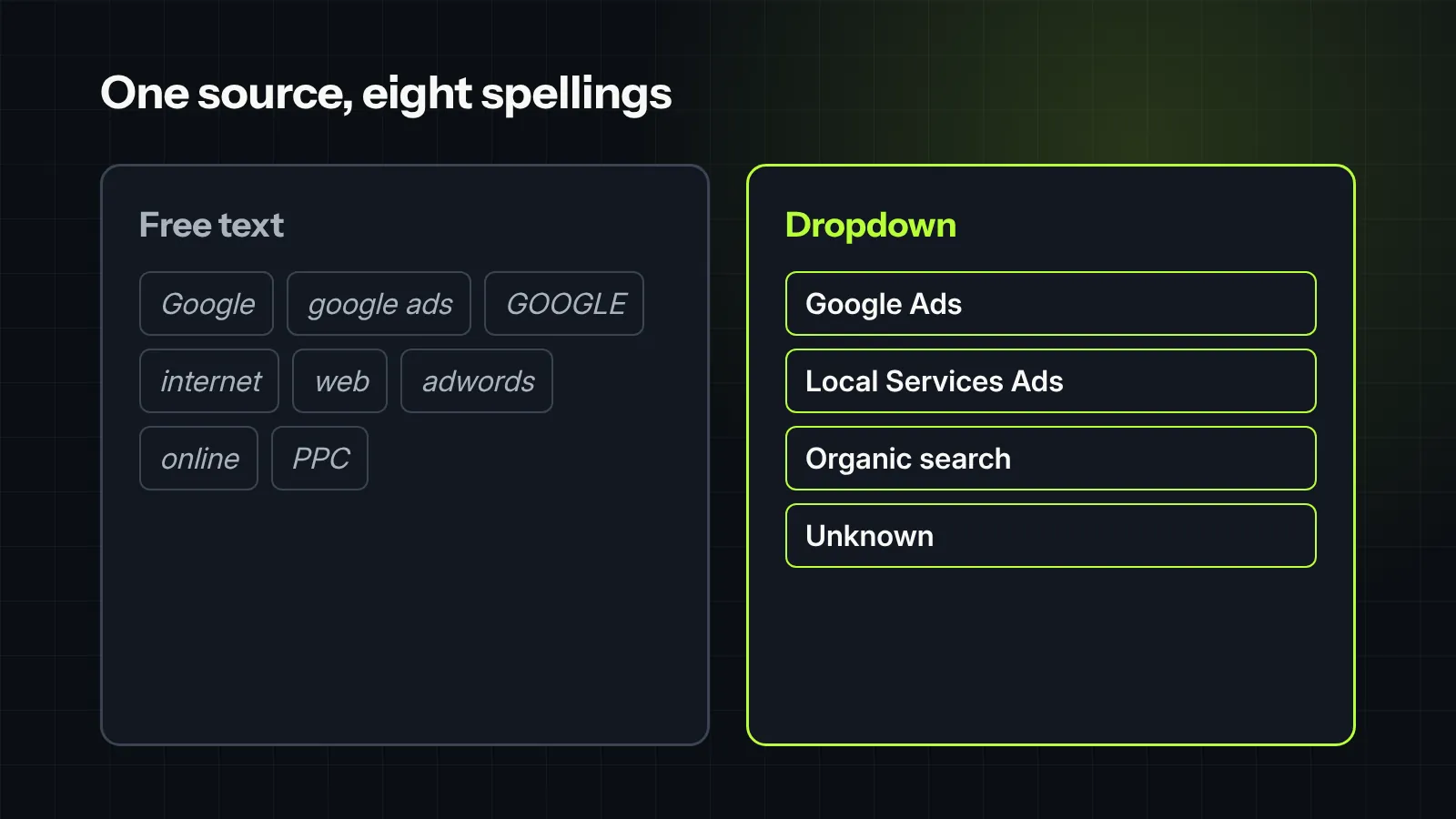
- Make the source a dropdown. No free text.
- Keep the list short. Ten to fifteen sources is plenty. Use a separate field for campaign details if you need them.
- Add “Unknown.” An honest unknown is better than a guess. Then work to shrink it.
- Clean up the old data once. Map the old spellings to the new list, then lock it.
Make the source stick from first call to closed job
The most common leak isn’t a missing source. It is an overwritten one. A lead from a mailer calls back later, and someone changes the source to “repeat customer” or “phone.”
- Set the source at first contact. Automatically from call tracking and web forms where you can, by the call taker where you can’t.
- Never overwrite it. If you want to record later touches, add a second field. The original source stays.
- Carry it to the job. The appointment and the job should inherit the lead’s source, not get a new one.
The monthly export, in about 30 minutes
- Export every lead created last month with the four fields.
- Build a pivot table by source: count leads, count appointments, count closed jobs, sum revenue.
- Add spend by source for the same month, from each platform’s billing.
- Divide. Booking rate, close rate, average ticket, cost per closed job.
- Re-run last month’s numbers too. Jobs close late, so the prior month will keep improving for a few weeks.
These numbers are made up to show the method. Swap in your own.
| Source | Leads | Appointments | Closed jobs | Spend | Cost per closed job |
|---|---|---|---|---|---|
| Google Ads | 60 | 30 | 11 | $6,000 | $545 |
| Local Services Ads | 40 | 26 | 10 | $4,000 | $400 |
| Lead marketplace | 50 | 15 | 3 | $3,000 | $1,000 |
| Referrals | 12 | 10 | 6 | $500 | $83 |
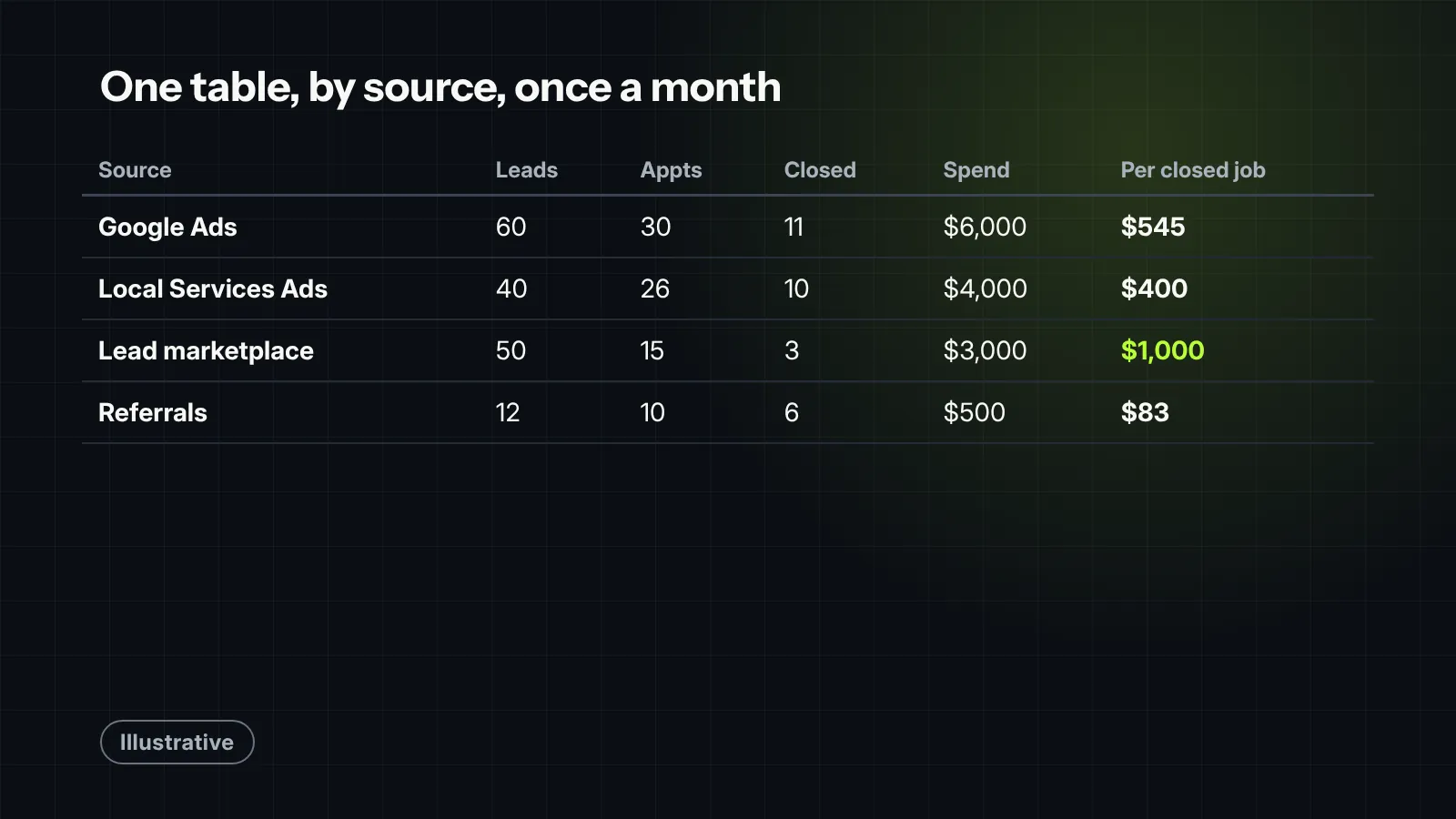
That one table answers more budget questions than most monthly agency decks. It also shows where the source data is still weak, if “Unknown” is one of the bigger rows.
Starting from zero? Do this in the first 30 days
- Week 1: make lead source a dropdown with a short, fixed list, and add “Unknown.”
- Week 2: connect call tracking and web forms so the source fills in automatically.
- Week 3: train call takers to pick a source and an outcome on every new lead, and lock the source so it can’t be overwritten.
- Week 4: run your first monthly export, even if the data is imperfect. The first report shows you what to fix next.
Don’t wait for clean history before you start. Start clean from today, and let the good data pile up.
Watch for the traps that skew the numbers
- Duplicate leads. The same homeowner calls and fills out a form. Merge them, or one source gets double credit.
- Cancelled and rebooked appointments. Count the appointment once, not twice.
- Customers with several jobs. Decide whether later jobs credit the original source. Most companies credit the first job to marketing and track repeat work separately.
- Financing and change orders. Use the final contract amount, and decide whether change orders count, then stick with it.
- Lost but not marked. Old open estimates sit forever and drag close rate down. Close them out as lost after a set number of days.
Give one person the job
Data hygiene is nobody’s job until it is somebody’s job. Pick one person, often the office manager or CSR lead, to own it.
- Daily: new leads have a source and an outcome.
- Weekly: a 10-minute check for blanks, “Unknown” and duplicates.
- Monthly: run the export and share the one-page table.
Ten minutes a week keeps the data usable. Skip it for a quarter and you are back to guessing.
Send the results back to your ad platforms
Ad platforms only learn from what you tell them. If Google only sees form fills and calls, it will find you more form fills and calls, including the ones that never book.
Google Ads lets you send results that happen later, such as a booked appointment or a closed job. Its help pages describe two ways: matching on the Google click ID saved with the lead, or enhanced conversions for leads, which matches on hashed customer details like email address and which Google recommends for new setups. Google’s guide to offline conversion imports covers the setup.
Google also says these uploads move to its Data Manager API starting June 15, 2026. If a CRM integration or tool sends your conversions, check that it made the switch.
Most CRMs and call tracking tools can send these results automatically. The four clean fields above are what make it possible.
Related: the five numbers an owner should see every month.

Field note
The messiest CRM setups always start with good intentions and free-text fields. We took over an account where the lead-source field had over 40 variations of “Google”—from “google ad,” “googl,” and “gogole organic,” to just the rep’s initials. Nobody actually knew which campaign was driving revenue. Once we locked down fixed source dropdowns, automated call-tracking tags, and started feeding offline conversion data for closed jobs back to the ad platforms, everything shifted. Algorithms stopped bidding on tire-kickers and started chasing real revenue, dropping their true cost per acquisition within 60 days.
What we would check first in your account
- Whether lead source is a dropdown or free text, and how many spellings of each source exist today.
- How many leads in the last 90 days have no source or “Unknown.”
- Whether the original source survives from first contact to the closed job.
- Whether you can export leads, appointments and closed jobs by source in one pass.
- Whether booked appointments or closed jobs are being sent back to Google Ads.
Want help connecting it? See our CRM integration and analytics and attribution work.


