

Short version: AI tools like ChatGPT, Claude and Gemini are only as good as the prompt you give them. Most marketing prompts fail because they skip three things: who you are, what the numbers say, and what the answer should look like. Start every session with a short company brief, then use the 12 prompts below for local SEO, ads, reviews, follow-up and reporting. Check every fact and number before anything goes live, and never paste customer details into a chat.
Plain definitions
- Prompt: the instructions you type into an AI tool.
- Company brief: a short block of facts about your business that you paste in before the real request, so the answer fits your company instead of a generic one.
- Hallucination: when an AI tool states something false with total confidence, like a made-up statistic or a rule that doesn’t exist.
- Converted lead: a lead that turned into an appointment.
- Cost per closed job: spend divided by jobs that closed.
Most marketing prompts work like the Magic 8-Ball on a 90s bedroom shelf. Ask a vague question, shake it, and get “Outlook good.” It sounds like an answer. It isn’t one.
“Write me a Facebook post for my HVAC company” gets you the same post every other HVAC company got. The fix isn’t a magic phrase. It’s giving the tool what a good marketing hire would ask for on day one.
Why most marketing prompts fall flat
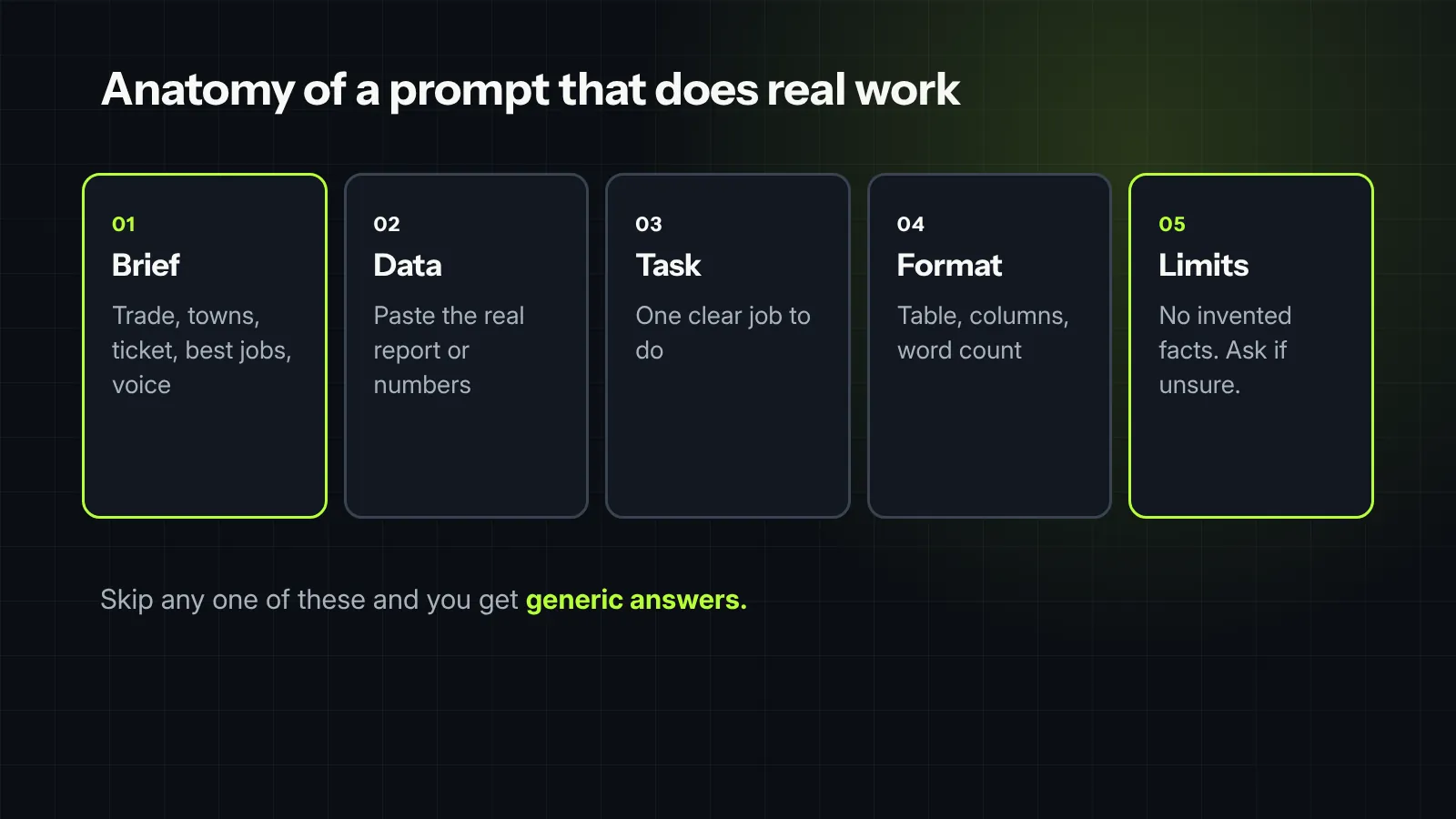
- No context. The tool doesn’t know your trade, your towns, your best jobs or your average ticket, so it guesses.
- No data. “Why are my leads down?” with no numbers gets a list of every possible reason.
- No format. Ask for “ideas” and you get a wall of text. Ask for a table with five columns and you get something you can use.
- No limits. Without a word count, a character limit or a reading level, you get filler.
Every prompt below fixes all four: it starts from your brief, asks you to paste real data where it matters, and spells out the format.
Step one: write your company brief once
Fill this in once, save it, and paste it at the top of every new chat. It takes ten minutes and improves every answer after it.
Company brief
We are [company name], a [trade] company serving [towns or counties]. Our best jobs are [job types], with an average ticket of about [$ amount]. We get most of our leads from [sources]. Our close rate on booked appointments is about [%]. Our customers are mostly [homeowner type, home age, price range]. What makes us different: [2 or 3 real reasons, like warranty, response time, family-owned since 1998]. Our voice is [plain, friendly, no hype]. Never invent statistics, reviews, prices or guarantees. If you need a number you don’t have, ask me.
That last line matters most. It tells the tool to ask instead of making things up.
Local SEO prompts
1. Keyword map by job type and town. Use it before you build or rewrite service pages.
Using our company brief, build a keyword map for our website. Organize it as a hierarchy: service category, then specific job type, then the towns we serve. For each job type, list the searches a homeowner would actually type, split into urgent (“emergency,” “today,” “near me”) and planned (“cost,” “replace,” “best”). Output a table with columns: job type, example searches, urgency, page that should rank, and whether that page exists today. Mark anything you’re unsure of as “check with real data.”
Then check the searches against real data, like Google Ads Keyword Planner or your Search Console queries. The AI gives you the structure. Your data tells you which searches actually happen.
2. Service page outline that answers the real questions.
Using our company brief, outline a service page for [job type] in [town]. Start with the five questions our CSRs hear most about this job: [paste them]. Give me an H1 that names the service and the town, a two-sentence plain answer to “what does this cost and how long does it take” with a range I fill in, a section for each customer question, a local proof section (photos, reviews, permits or conditions specific to that town) and a call to action. Flag any section where I need to add real local detail.
Why the CSR questions matter is covered in how Google decides which contractor gets the call: pages that answer real questions plainly are the ones search engines and AI answers quote.
3. Business Profile audit checklist.
Create a checklist to audit our Google Business Profile against our company brief. Group it into: categories and services, business information, photos, reviews and replies, posts, and Q&A. For each item, write what “good” looks like for a [trade] company and how to check it in under a minute. Output as a table with columns: area, item, what good looks like, how to check, pass or fix.
Paid ads prompts
4. Negative keywords from your search terms report. This one pays for itself the first time.
Below is last month’s Google Ads search terms report: [paste search term, clicks, cost, conversions]. Using our company brief, sort every search term into: keep, add as negative, or review. Negatives are searches that could never become a paying job, like DIY, jobs and salaries, other cities we don’t serve, or services we don’t offer. Output a table with the search term, the decision, the reason, and the cost we spent on it. Then give me the negative keyword list on its own, ready to paste.
5. Responsive search ad copy within Google’s limits.
Using our company brief, write a responsive search ad for [job type] in [town]. Google allows up to 15 headlines of 30 characters and 4 descriptions of 90 characters. Write 15 headlines and 4 descriptions, and show the character count next to each one. Include the service, the town, at least two of our real differentiators, and a clear call to action. No claims we can’t prove, no “best” or “#1” unless I confirm it, and no prices unless I give them to you.
Google’s help page on responsive search ads has the current limits. Check the counts yourself; AI tools miscount characters more often than you’d think.
6. Local Services Ads lead review.
Below is our Local Services Ads lead list for the last 30 days: [paste date, job type, lead type, charged or not, outcome]. Group the leads by job type and show for each: leads, booked, closed, and cost per closed job. Flag job types that cost us money without producing jobs, leads that look like they qualify for a credit, and any pattern in missed calls by day or hour. Keep it to one table and five bullet points.
Pair it with the ceiling math in Local Services Ads vs. Search ads, so you know which job types are worth paying for.
Reviews prompts
7. Review replies that sound like you.
Using our company brief, draft a reply to this review: [paste the review, with the customer’s last name and any details removed]. Keep it under 80 words. Thank them by first name only, mention the specific job in general terms, and sound like the owner, not a call center. If the review is negative, acknowledge the problem without arguing or sharing details of the job, and invite them to call [name] at [number]. Give me two versions.
8. A review request that gets answered.
Using our company brief, write a text message our tech can send right after a finished job asking for a Google review. Under 300 characters. Use the customer’s first name and the tech’s first name, mention the job in a few words, and include [review link]. No incentives, no pressure. Then write a shorter follow-up for two days later if they haven’t left one.
Don’t offer anything in exchange for a review. Google’s review policies don’t allow incentives, and the FTC’s rule on fake reviews bans paying for positive ones.
Follow-up prompts
9. An estimate follow-up sequence.
Using our company brief, write a five-touch follow-up sequence for an open estimate over two weeks: day 0 text and email, day 2 call script, day 5 email, day 9 call and text, day 14 close-the-loop text. Each message needs a real reason to reach out, the homeowner’s first name, the salesperson’s first name and the job type. Texts under 300 characters. No discounts. Output as a table with the day, channel, purpose and message.
The thinking behind each step is in estimate follow-up: a simple two-week sequence.
Reporting prompts
10. Diagnose a bad month, one step at a time. This borrows a structure that works for any messy question: break it apart, explain each piece, connect them, then decide.
Here are our numbers for the last three months, by lead source: [paste leads, booked appointments, closed jobs, revenue and spend]. Work through this in five steps. 1. Break the change into its parts: lead volume, booking rate, close rate, average ticket and spend. 2. For each part, say what changed and by how much. 3. Explain how the parts affect each other. 4. Name the one or two changes that explain most of the drop, and what we’d need to check to confirm them. 5. Finish with a three-sentence summary an owner can read in 20 seconds. Show your math. Don’t guess at causes the numbers don’t support.
Those five numbers are the same scoreboard as the five numbers an owner should see every month.
11. Find the leak between lead and job.
Using our company brief, map what happens to a lead from the first call or form to a closed job: every handoff, who owns it, which system it’s logged in, and how long each step usually takes. Then look at it as a system: where do communication, ownership, measurement or timing break down? List the five most likely leaks, the number that would show each one, and a fix for each. Output as a table.
Content prompts
12. Turn one finished job into a week of content.
Here are notes and photo descriptions from a job we just finished: [paste notes, with no customer names or addresses]. Using our company brief, turn this into: a short project write-up for our website (200 to 300 words, with the problem, what we did and the result), a Google Business Profile post (under 100 words), and a Facebook post (under 80 words). Keep the facts exactly as I gave them. Don’t add details I didn’t provide.
Pick the right prompt for the job
Find the problem you’re working on, and start with the prompts next to it.
| If you want to… | Start with |
|---|---|
| Show up in more towns | 1, 2 and 3 |
| Stop wasting ad spend | 4 and 6 |
| Write better ads | 5 |
| Get more and better reviews | 7 and 8 |
| Close more estimates | 9 |
| Figure out a bad month | 10 and 11 |
| Post more without more work | 12 |
Five rules before anything goes live
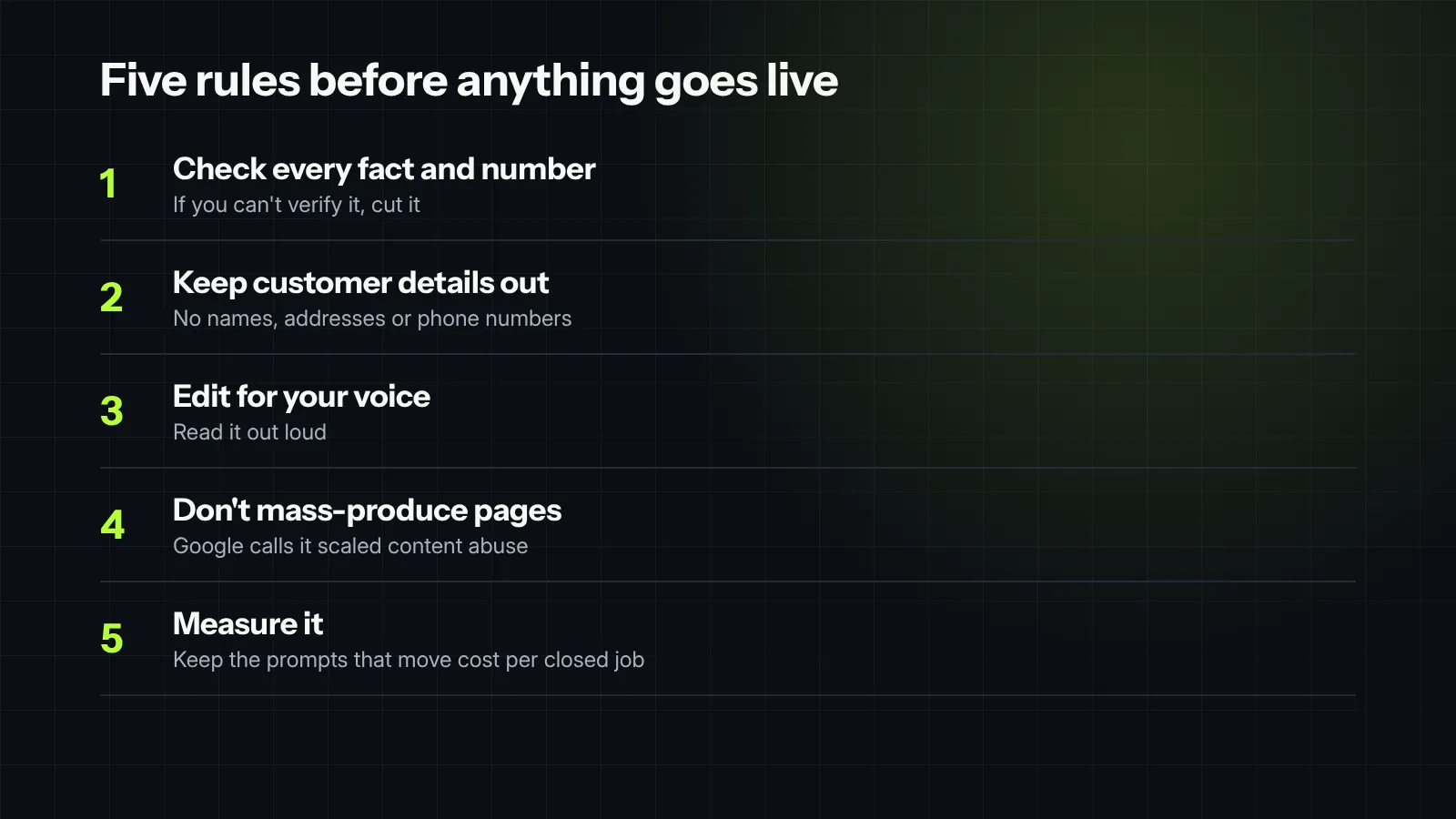
- Check every fact and number. AI tools make up statistics, prices and rules with a straight face. If you can’t verify it, cut it.
- Keep customer details out. Strip names, addresses and phone numbers before you paste anything. Most AI tools keep your chats, and some use them for training unless you turn it off.
- Edit for your voice. Read it out loud. If it sounds like a brochure, rewrite it.
- Don’t mass-produce pages. Google’s spam policies list “scaled content abuse,” including using AI tools to churn out many pages without adding value. Ten real service pages beat a hundred generated ones.
- Measure it like anything else. A prompt that saves an hour is nice. A prompt that changes cost per closed job is the one to keep.

Field note
Most people use AI like a search bar, asking generic questions and getting generic blog fluff back. The trick to getting real work out of LLMs in home-service marketing is treating the prompt like a job scope. When you feed the model real constraints, exact operational context, and a clear tone of voice, it stops regurgitating textbook advice and starts drafting usable ad copy, customer email sequences, and local landing page outlines. AI isn’t going to replace your marketing strategy, but with the right prompts, it operates like a high-powered assistant that handles the tedious heavy lifting in seconds.
What we would check first in your account
- Whether you have a written company brief, and whether your team uses the same one.
- Last month’s search terms report, run through prompt 4.
- Your Local Services Ads job types, by cost per closed job.
- Your review replies and review requests: how often, how fast and how personal.
- Which AI-written pages or posts are live today, and whether anyone checked them.
Want help putting AI to work on real numbers? See our marketing automation and GEO / AEO work.


